Task details
A task’s details tell the scheduling algorithm what the work needs: how long it takes, who may do it, and where it happens. The fewer constraints you add, the more room the optimizer has — add them with care.
Duration
Section titled “Duration”The task’s estimated duration. Together with the time window this is the main input for fitting the task into a workday.
estimated time, length, how longThis field is shown when tasks involve transporting goods. The Load value is how much the task adds to the vehicle’s load, and the algorithm ensures that vehicle capacity is not exceeded at any point of the day — see Vehicle capacity.
load, cargo, weight, goods, vehicle capacity, unitsLoad
Transport onlyGoods to be carried; the algorithm keeps the vehicle within capacity all day.Comments
Section titled “Comments”The contents of this field are also visible to workers in the day view.
notes, instructions, visible to workerLocation
Section titled “Location”Determines which Location’s workers the task is given to.
team, assignee group, location, work groupIdentifier
Section titled “Identifier”Used for sorting tasks, e.g. in the calendar and in statistics.
A new identifier is created simply by typing it into a task: once used, it becomes a selectable identifier for other tasks too. The identifier’s color — the color of its segment pill in the calendar — is set in task segment settings, not on the task itself. That color is useful for telling task kinds apart at a glance, and for prioritizing by identifier during scheduling.
sorting, category, label, typeRequirements
Section titled “Requirements”The algorithm assigns the task to a worker who has the same requirement (skill) in their details.
The available skills are maintained on the Skills tab in settings (a MainUser task) and can be assigned to vehicles and workers as well as required by tasks. Beyond worker competence, a skill can mark a task that needs a specific kind of vehicle — for example a tanker — so the scheduler always assigns suitable equipment.
A task with no requirement set can be assigned to any worker. If tasks keep landing on people who shouldn’t be doing them, first check that the requirement is actually set on the task.
The reverse also happens: a missing or misplaced skill on a worker silently excludes them from tasks that need it. If the optimizer keeps leaving one worker’s day empty or underfilled while others fill up, compare that worker’s skills against the requirements on the tasks you expect them to get.
skills, qualifications, competence, wrong worker, empty day, skill missing, audit log, who changed a skillAdding, removing or re-levelling a skill on a worker or a vehicle is recorded in the audit log. It is a technical record rather than a readable history — there is no per-worker skill history to browse, and only users whose role grants access to the audit log can see it. Changing the requirement on a task is not recorded at all. Still agree within your team on who maintains skills.
Possible workers
Section titled “Possible workers”You can restrict the task to specific people (e.g. because of access permits).
Note: Restricting workers reduces the algorithm’s possibilities to optimize the schedules — use this only when the restriction is real.
restrict, access permit, specific peopleParking time
Section titled “Parking time”Represents the time spent on, for example, parking the car. It is added for arriving at a location only once, even if there are several tasks at the location in the calendar.
parking, arrival time, location overheadSuggestions
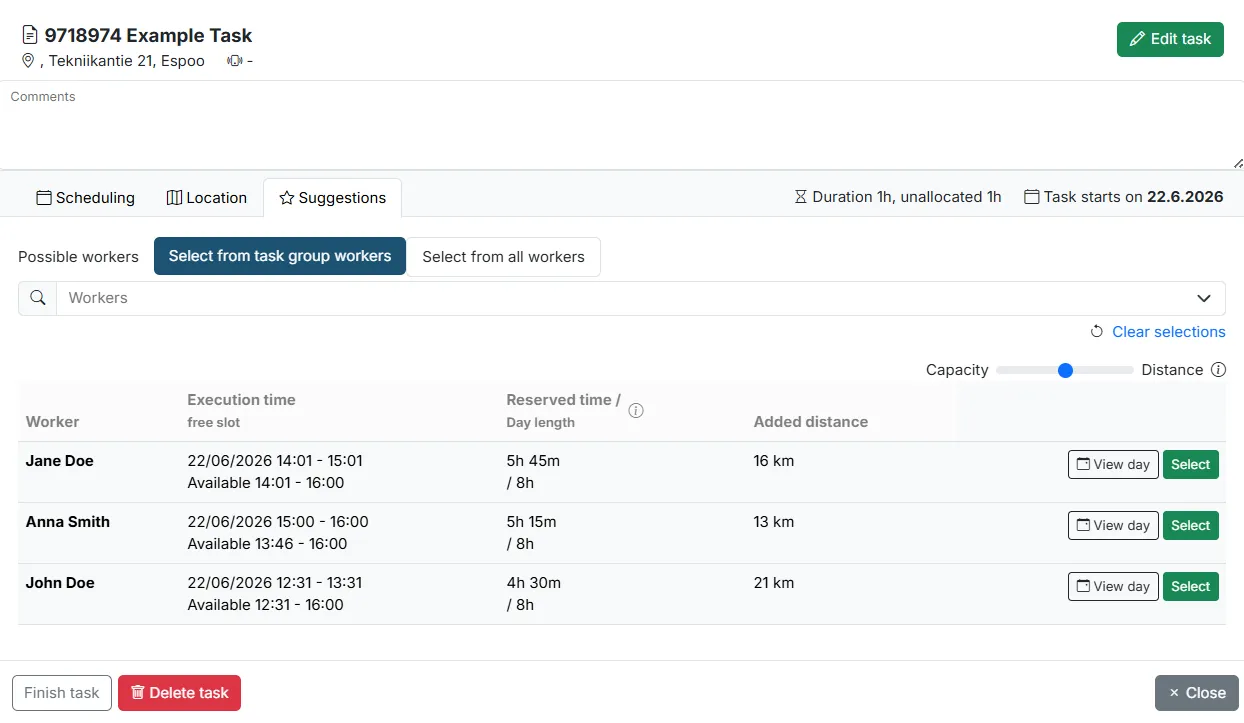
Section titled “Suggestions”The task card’s Suggestions view lists times and workers that could take the task. It is the fastest way to place one specific task — for example a skill-restricted job — without scanning the calendar or the map yourself. For each candidate it shows the execution time and free slot, the reserved time against the day length, and the added distance; Select assigns the task to that worker and time.